Hiya!
“Ooh, what’s this?”
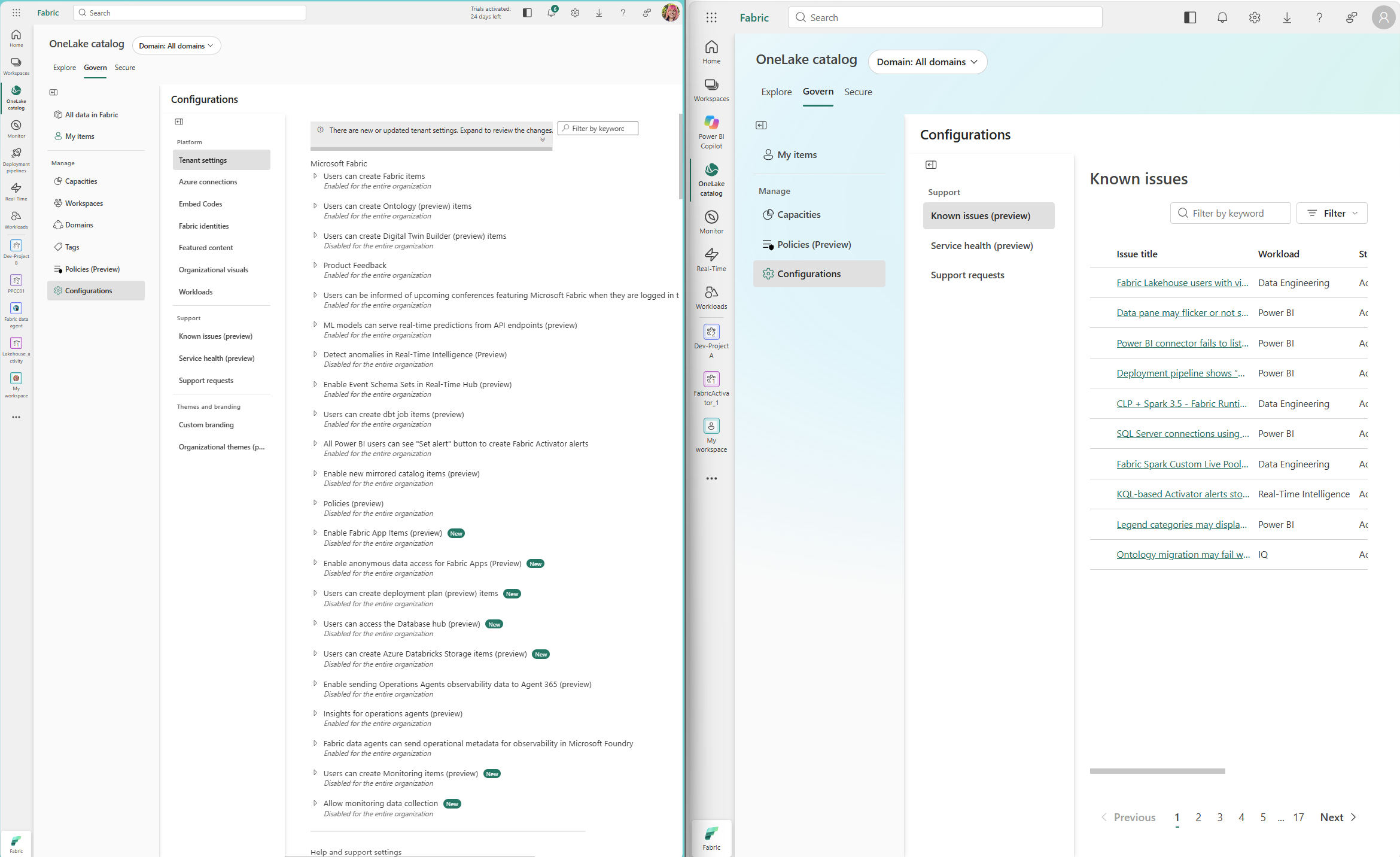
That was me this week, poking around the OneLake catalog. It keeps getting better and better, and I spotted something that made my admin heart very happy. The Govern tab now has Configurations > Tenant settings, right there in the catalog.

And it’s not just tenant settings. Under Platform you’ve also got Azure connections, Embed codes, Fabric identities, Featured content, Organizational visuals and Workloads, with Themes and branding further down. There’s a filter by keyword and a banner letting you know “There are new or updated tenant settings.” New settings get a little New tag too. This week that meant Fabric App Items and anonymous data access for Fabric Apps.
I was already drafting this post in my head. Finally! Everyone can see how the tenant is set up!
And then I realised.
I was logged in as my tenant admin.
So I logged in as a test user…
Off I went to my trusty test user, someone who is not a tenant admin.

Boo.
The Govern tab is there. Under Manage you get Capacities, Policies (Preview) and Configurations. Click into Configurations and the whole Platform section is gone. No Tenant settings, no Workloads, nothing. All you get is Support: Known issues (preview), Service health (preview) and Support requests.
My excitement faded pretty fast.
If you read my post, you might remember the admin portal works the same way. If you only see Capacity settings, you’re not a Fabric Administrator. Same idea, new home.
Credit where it’s due
I don’t want to be all doom and gloom, because the non-admin view has some real wins. Putting Known issues and Service health in front of every user is fantastic. That’s someone finding out “oh, it’s not me, it’s a known issue” without opening a ticket or sending their admin a message. Every Fabric admin is quietly cheering.
Why does this matter?
Here are some questions I get all the time:
- “Why can’t I create that item? I saw it in a demo!”
- “Is that preview feature turned on for us?”
- “Am I allowed to export to Excel?”
- “Who can publish to web in our organisation?”
Right now almost all of those end up with an admin, who then goes and looks it up. A read-only view of tenant settings for all users would let people answer those themselves, and it would make governance a lot more visible. It’s much easier to explain a setting people can actually see.
To be clear, I’m not asking for edit rights. Admins still own the decisions. I just want everyone to be able to see them.
And if showing everything feels like too much, there are some reasonable middle grounds:
- Show the setting and whether it’s on or off, but hide which security groups it’s scoped to
- Or (and I can’t believe I’m saying this) add a tenant setting that controls whether non-admins can view tenant settings
In the meantime
Until that day comes, here’s what I’d suggest:
- Extract and share your settings. The Fabric admin APIs can pull out every tenant setting: its name, section, whether it’s on or off, and more. I walked through a notebook for this in my post. Run it on a schedule and share the results in a report or on your community-of-practice site.
- Point users to the Support section. Known issues and Service health in the Govern tab already work for everyone.
- Raise it as an idea. If you’d like to see this too, let Microsoft know. If you’re not sure where, I’ve got a on where to raise feature requests for Microsoft products.
The takeaway
The Govern tab is a big step toward one place for discovery and governance in Fabric, and I’m genuinely excited about where it’s heading. There’s always room for improvement, though, and I really hope one day there’s a read-only view of tenant settings for everyone on the platform.
Until then, I’ll keep checking things as my test user.