“Wait, you can do WHAT now?”
That was my reaction this week while poking around the Fabric UI for trial capacities. It’s one of those settings that’s been sitting there quietly, and once you find it, you wonder how you missed it.
The Default You Might Not Have Questioned
When you provision a Microsoft Fabric trial, it spins up at F64 by default. That’s the equivalent of 64 Capacity Units — a solid chunk of compute. For most trial users, this is just the number they see and never think twice about.
But here’s what I just discovered: you can change it.
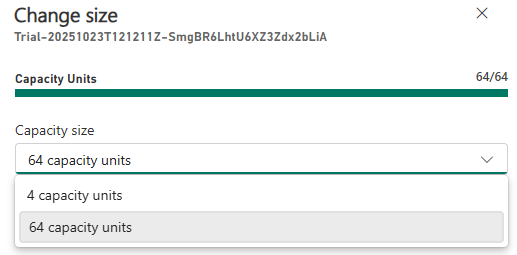
How to Resize a Trial Capacity
It’s tucked away in a place you might not visit often:
- Head to the Fabric Admin Portal
- Go to Capacity settings
- Select the Trial tab
- Click on your trial capacity name
- Click Change size
When you do, you’ll see a dropdown that lets you switch between 4 capacity units and 64 capacity units.


That’s it. Two clicks and you’ve updated trial size.
Why Does This Matter?
This is bigger than it looks, especially if you’re thinking about governance and CU efficiency across your organisation.
At F64, developers and content creators have a lot of headroom. That’s great for exploration, but it also means inefficiencies can go completely unnoticed. Nobody optimises a query when there’s a mountain of capacity sitting idle.
Dropping trial users to F4 (4 CUs) forces good habits earlier:
- KQL queries need to be thoughtful, not lazy
- Dataflows and pipelines should be efficient by design
- Reports that hammer the capacity will surface immediately
My suggestion to anyone building on Fabric: design for your production environment constraints from the start. Yes, do your capacity planning and give yourself some buffer — but don’t go so far above that you’re burning money on capacity you’ll never use. If your workload runs well on F4 in trial, you’re in a much better position when it’s time to size a paid SKU.
A Governance Play, Not Just a Cost-Saving Trick
For Fabric admins and platform engineers, this is worth thinking about as a policy, not just a one-off change. If your organisation runs Fabric trials for onboarding new developers or upskilling business users, defaulting them to F64 gives them a misleading view of what performance actually looks like in a right-sized environment.
Running trials at a smaller SKU:
- Encourages CU-aware development practices from day one
- Makes capacity throttling visible while it’s still safe to experiment
- Gives you a more realistic picture of whether a workload is ready for a production capacity
It’s a small configuration setting with some genuinely useful governance implications.
The Takeaway
Next time you spin up or manage a Fabric trial, check the capacity size. If the team using it is learning or experimenting rather than running production workloads, consider whether F64 is serving them — or just masking inefficiencies you’ll have to deal with later.
Small settings, big habits.

1 thought on “Did You Know Your Fabric Trial Capacity Doesn’t Have to Be F64?”